

Your Live Adult Video Chat Solutions Specialist
+1-702-550-0087
Email: [email protected]
ODYSSEY ENTERPRISES, LLC
7260 W. Azure Dr, STE 140-2001, Las Vegas, Nevada, 89130, United States



Now you are able to broadcast, view, cam2cam, buy credits and paid sessions directly from your mobile compatible device and more...


Latest News
-
 Qualifying accounts can now process payments using PayPal, Merchant Account signup required.
 -
 You can now process payments using Cryptocurrencies,
 -
 OdysseyCam has just released version 10.5! with new features and improvements.
 -
 Our partners at bitsafe have changed their name to Yoursafe to better reflect more accurately their mission, vision and corporate values
 -
 Don’t lose paying members due to inefficient software solutions, our advanced programming will keep your broadcasters and members connected. Learn More...
 -
Now broadcasters can block their profile and Live Stream down to the Region level, low cost monthly subscription.
-
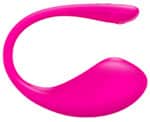
 Lovense is now integrated into the OdysseyCam platform, game apps, visual tip effects, and more...
 -
Just released: Built-in Affiliate Program, Member Chat, Group Chat and Lovense Vibrating toy integration.
-
 Now there is more bandwidth with each Edition package, at no extra charge!
 -
OdysseyCam is still a leading professional video chat business platform provider, in 2024!
-
 OdysseyCam has released its Mobile Ready™ compatible responsive platform.
 -
OdysseyCam now offers 1 hour setups for all turnkey packages.
-
 Exclusive for OdysseyCam Customers: No setup fees, no yearly Visa or MasterCard registration fee, no weekly or monthly account fees and a 5% Transaction Rate!
 -
Pay your broadcasters directly from your Bitsafe account: Pay directly to a Bitsafe Debit Card, Free signup for site owners and broadcasters.
-
 We are happy to announce our platform has been upgraded to WebRTC real-time communication.
 -
OdysseyCam Dedicated Cloud Service has been upgraded to a state-of-the-art infrastructure.
-
We have added 3 new Rent-To-Own Turnkey Package Editions, with simple monthly installments.


















Now you can add CCBill to your OdysseyCam system!
Pay Broadcasters:

Pay your broadcasters to a yoursafe Debit Card, or by Bank Wire right from your yoursafe account, Free Business and Broadcaster Accounts.

Tired of having to refresh the webpage to see the broadcasters that have just signed on? Having to log out or back in just to see the updated information is a thing of the past. Now OdysseyCam updates Broadcaster headshots and credits to broadcaster & members account in Real-Time!

Your OdysseyCam system comes with a configurable Pay-Per-Minute Billing System. Create multiple price blocks in seconds.

Having a weekly or bi-weekly payout schedule is a thing of the past, with Anytime Payouts™ your broadcasters can get paid Anytime they want!
Your One Stop Full Service Provider

We make it simple

What is a Custom Turnkey System?
A custom turnkey system is where we take a "Turnkey Out of the Box" package and customize it with new features, themes as requested to fit your needs.
Not all video chat provider companies can customize their software, at least not without issues., it just ends up breaking the script and or resulting in multiple nonfixable bugs. OdysseyCam is noted for its programming and efficiency in working with our scalable video chat solution.
I am new to this, how do I get started?

Managed Hosted Solution vs Host-Your-Own

It’s all about support, if most people would not have to worry about the technical issues of their online business and would concentrate on the marketing (i.e. the advertising), more live adult webcam businesses would be seeing a profit.
With OdysseyCam's complete managed service you don't have to worry about your server or the technical aspects of keeping one running, you will appreciate the cost savings and business advantages of our secure and managed solution.
The OdysseyCam Ideology

The most successful companies started from an idea or Standard of Excellence belief within their team environment. These daily practices are usually maintained by the originating owner until the business expands or is sold, the originators ideas are generally lost, as the general whole believe a successful company is based on the amount of monetary gain, very true but limited. The OdysseyCam Ideology is simple, but yet far more effective: The company who bases their success from the success of their customers, out weighs the actual sales of their own. OdysseyCam is a True Full Service Provider from beginning to end.